Featured image: Lego_messy_desk by pasukaru76 via Wikipedia CC-BY 2.0
To keep track of the various tasks, suggestions and issues that arise day-to-day, DoES uses an issue tracker in a GitHub project called “somebody-should” …and it’s turned in to a monster backlog!
Over the past couple of weeks, I’ve been poking around trying to tame it…
The problem?
Regular followers of DoES #weeknotes will be familiar with the “Somebody Should” section – it summarises issue tracker activity for the past week, specifically:
- Total open vs. closed issues
- Summary of new issues
- Summary of resolved issues
In the recent post, there were 170 open issues in the tracker.
That’s a lot.
One of the things I always check for when looking at anything on GitHub, particularly open source projects, is the number of open issues. If there’s loads of them, particularly if some are ancient, then I start to twitch.
That being said, the rest of the #weeknotes – every week for years on end – shows that the DoES community get through a staggering amount of epic stuff each week.
So why the huge backlog of issues?
Is GitHub the wrong tool?
GitHub isn’t really a task management system – it’s a code management system with code-related issue management as part of the package.
But it’s also home to hundreds of thousands of open source projects, not to mention most of stuff that DoES does. So, while it’s perhaps not the most ideal way to track tasks, it’s adequate and familiar to most of the people who frequent DoES.
It’s also practically free, widely adopted, easy to use and reliable.
In any case, I don’t think choice of issue tracking tool has much to do with this backlog, and I’m going to illustrate why…
Is it a deluge?
The first thing I wanted to check was the rates at which issues are created vs. resolved. Is it simply a case of the small core DoES team being overwhelmed by the surprisingly large and diverse community that DoES serves?
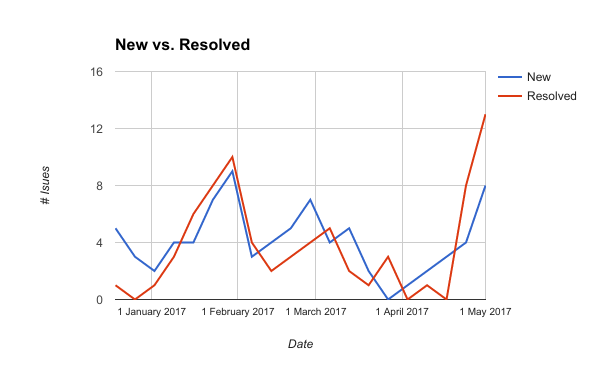
New vs. resolved issues on DoES issue tracker
Issues are being resolved at roughly, but not quite, the same rate as they are being created.
Over the ~6 month period shown in the graph, averages are:
- 4.1 issues / week created
- 3.75 issues / week resolved.
That’s a weekly growth of +0.35 issues per week.
DoES has been running for something like 6.5 years – about 338 weeks:
0.35 * 338 = 118.3
A rough calculation based on a small sample size, but I think it’s clear what’s happening: Death by 338 consecutive weeks of paper cuts.
That tiny increase, over time, has created a monster. Add in a few actual deluges, like plans to improve the website and relocate DoES to bigger premises, and you end up with a backlog of 170 issues.
So, how do we tame it?
Prune dead issues…
GitHub issue search syntax let’s us find dead issues, real quick:
is:issue is:open updated:<2015-05-04
That will list issues which haven’t seen any action prior to the 4th of May 2015.
When I ran these searches over the past few weeks, it turned up about 50 dead issues.
Autopsy
Based on the dead issues I’ve examined so far, they fell in to one or more of the following categories:
- Forgot to close (roughly 20%)
- It’s on my to-do list (roughly 50%)
- Had to deal with more recent stuff (roughly 20%)
- Is that still a thing? (roughly 10%)
A few were closed immediately, the rest were labelled “Stale” and commented “If no further action taken, this issue will be closed next month“. At that point, lots of tickets started getting comments asking not to close them.
My perspective is this: If it’s not been updated in over 2 years, it’s either:
- Not required, or
- Never going to get done
And probably both. In other words, it’s pretty much dead and we need to either accept that, or make a last ditch but concerted effort to revive it.
After the first couple of batches of stale ticket hunting, which included one about a Hyacinth pot plant trying to escape, we ended up with this:
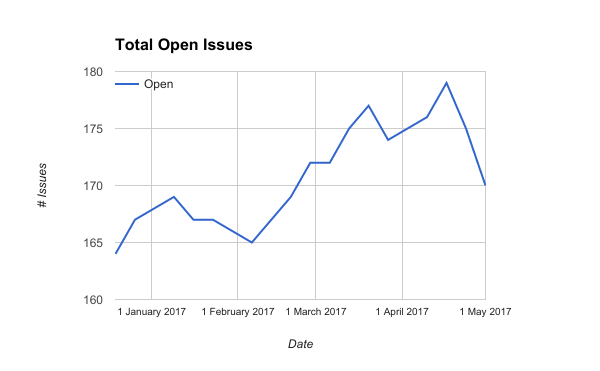
Total open issues on the DoES issue tracker.
Mid-April was when the first batch of dead tickets were marked stale.
What’s in a (label) name?
Sometimes things just gradually get out of hand, and issue labels (tags) were the next aspect of our tracking system to face scrutiny.
For example, issue priority was defined with labels such as:
- You’re All I Need To Get By
- The Time Is Now
- Wouldn’t It Be Nice
Apparently those are snippets of song lyrics, but the first time anyone encounters them it’s a serious case of…

Me, when I first saw the labels used to prioritise issues…
They’re not particularly conducive to getting things done.
The Russians’ did it!
Mark Sabino suggested using the MoSCoW method to tame the prioritisation labels:
- Must
- Should
- Could
- Won’t
After some tweaking, the final – hopefully self-explanatory – result:
- 0 – Triage
- 1 – Must DoES (as in Do Epic S…)
- 2 – Should DoES
- 3 – Could DoES
- 4 – Stale
- 5 – Won’t DoES
Which enables us to take advantage of…
Huboard
DoES has been using Huboard for a while – it’s a lightweight kanban board which organises issues in to swim lanes based on their labels; specifically, labels that follow a particular naming pattern.
It makes it a lot easier to see at a glance what’s going on, it’s a useful dashboard (click image to zoom):
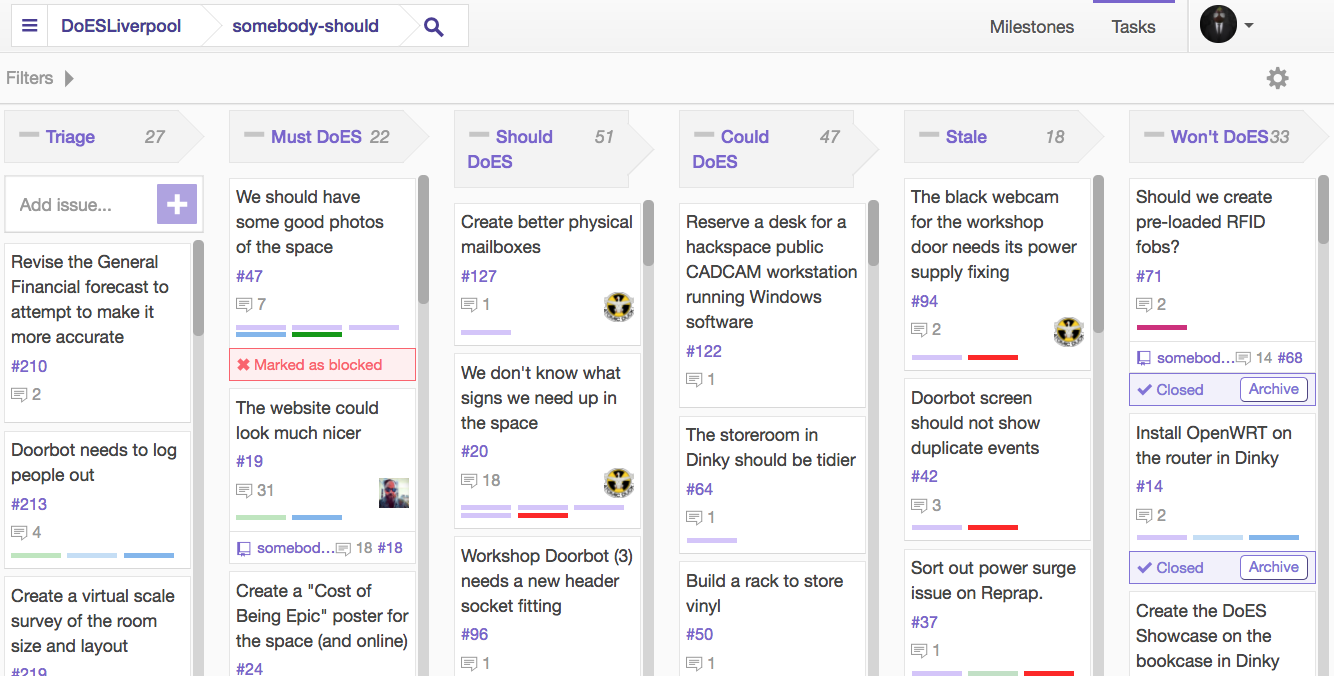
Huboard kanban board
If you’ve got a GitHub account, you can view it live here (otherwise you’ll just see the Huboard home page).
What about the other labels?
The remaining labels covered everything from parking spaces to bandsaws to shopping.
Machine-specific labels mostly used the “pet name” for the machine, rather than what the machine actually is or does. For example, “Gerald” and “Sophia” – to a newbie these labels are opaque, it’s only after a guided tour of the workshop that you’re likely to learn that Gerald is a large laser cutter (“Gerald the Great”) and Sophia is a small laser cutter (“Sophia the Small”).
Onboarding is a decidedly non-trivial task with labels like these – there’s just too much prerequisite novel knowledge for every facet of the labelling system for anyone to pick it up in a reasonable amount of time.
After reading an excellent blog post by Zach Dunn, most of the other labels were renamed and recoloured to form label groups:
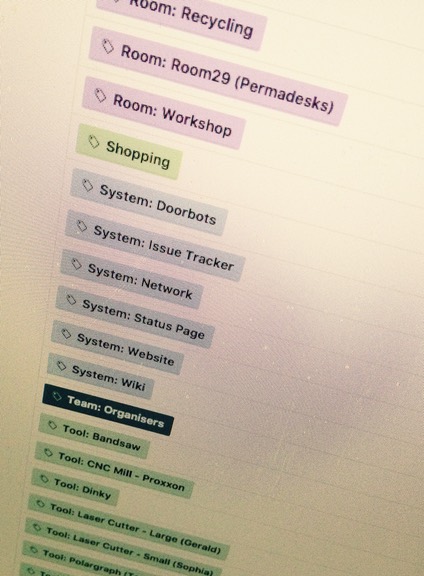
Grouped labels
For example, tools follow this label convention:
Tool: <type> - <model or size> (pet name)
So, Gerald’s label is now:
Tool: Laser Cutter - Large (Gerald)
Previously, that label was just:
Gerald
Great if you already knew about Gerald, but confusing for newbies like me. Hopefully these new label conventions will make onboarding a bit easier.
Enter the Status Page…
GitHub has an API that makes it easy to integrate with external systems – it’s a double-edged sword.
Pros:
- DoES made a Status page summarising the health of various tools and systems
Cons:
- Any changes to the label names in GitHub break it.
Why? If you change the name of a label, the URLs change = fail. GitHub, it seems, doesn’t assign unique IDs to labels (or if it does, our status page isn’t using them).
Documenting labels
None of the labels were documented anywhere, or, if they were, it was in lots of fragments in lots of places.
We’ve made a start on documenting our labels, and when/where to use them, and what effects changing them might have on external systems. It’s a bit verbose, but at least it’s put the information in one place.
How do people find that page? Github lets you display a link to Contributor Guidelines on the “new issue” screen:
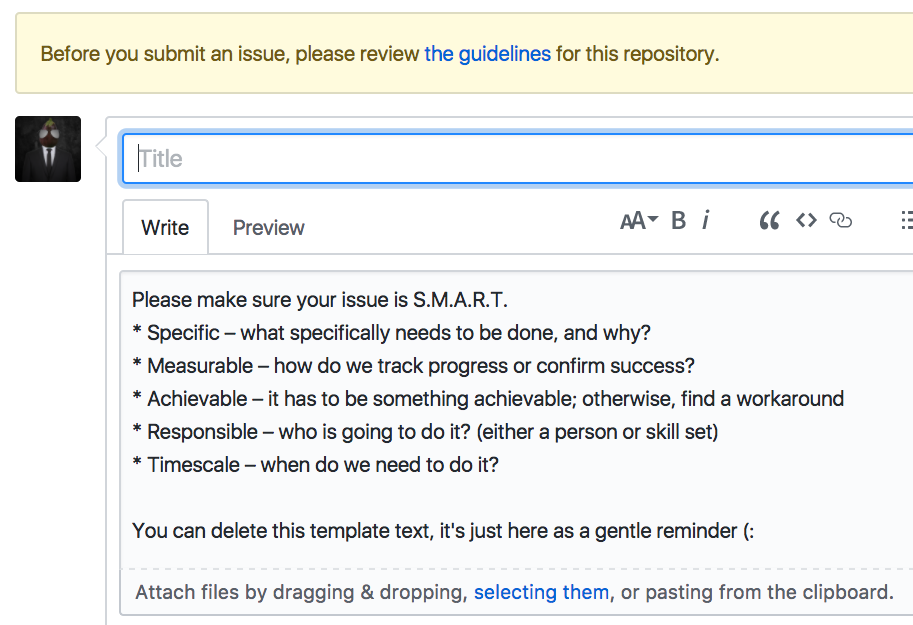
New issues now show link to contributor guidelines, and also some template text in the new issue field…
Be S.M.A.R.T.
What about the issues themselves? Alex Lennon suggested we promote S.M.A.R.T. criteria when creating issues:
- Specific – target a specific area for improvement.
- Measurable – quantify or at least suggest an indicator of progress.
- Achievable – state what results can realistically be achieved, given available resources.
- Responsible – specify who will do it.
- Timescale – specify when the result(s) can be achieved.
How do we let people know about those criteria? GitHub has a template for new issues (you can see it in action on the image posted above).
There are probably other things to improve, but for now it’s time to let the dust settle and monitor the tangible effects (or lack of) of the alterations.
I’d love to hear your feedback and suggestions, but it seems commenting is disabled on the website. *adds new issue to github*